Studio OS — the company that works continuously and still asks first
Studio OS is a shared workspace where a team of AI specialists handles day-to-day business work: reading incoming mail, maintaining customer context, preparing replies and proposals, coordinating projects, researching questions, and preparing invoices. You remain the operator. External messages, commercial commitments, accounting entries, and other consequential actions stop for human review.
This handbook follows a customer from first contact to a live delivery project and Sille's accounting practice from its first day in Studio to an organised routine for ten clients. The reference chapters describe current capabilities. Sille's story also looks ahead to the experience we are building, combining existing capabilities with planned improvements.
The operating model
Studio OS separates three things that are easy to blur together:
| Object | What it means | What happens to it |
|---|---|---|
| Client | The lasting relationship and its people, email history, notes, and documents | Stays in the client directory |
| Deal | One sales opportunity with a value and stage | Moves through New → Qualified → Proposal → Won/Lost |
| Project | A concrete piece of delivery work | Moves through its delivery statuses until Done |
A client can have several contacts, repeat deals, and several projects. Winning one deal creates one project and freezes the accepted sales context into a handoff brief. The client record remains for the next conversation.
Incoming email
      │
      ▼
Email router ── identifies the client and the relevant open work
      │
      ▼
Kairi ── client + deal ── proposal draft ── human review
      │
      ▼
Customer accepts ── win confirmation ── human approval
      │
      ▼
Won deal ── project + frozen brief ── Madis runs delivery
      │
      ▼
Liisa prepares the invoice ── human approval ── accounting
What you review
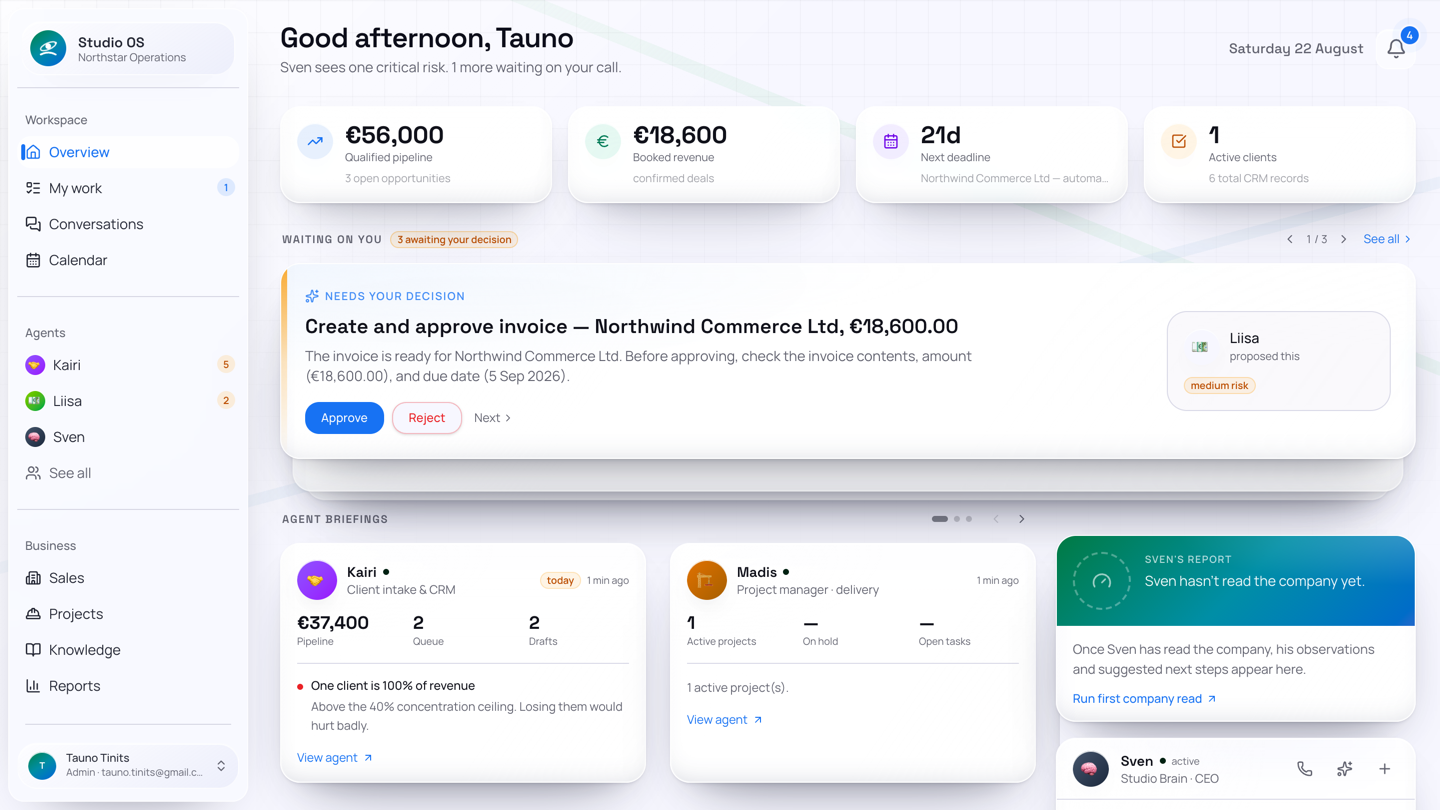
The dashboard brings two kinds of waiting work together, while keeping their different lifecycles clear:
- Message drafts are reviewed in the relevant agent's Drafts view. You can edit, approve, and send them. Depending on company settings, approval can send immediately or leave a separate Send step.
- Approvals are decisions such as confirming a won deal, posting an invoice, or applying a file change. The Approvals page shows the proposed action, rationale, risk, reviewer, and history.
Internal record-keeping can continue in the background, but a sent message or binding commitment is not silently made on your behalf.
The promise, precisely
- The agents prepare the work. They collect context, update records, draft, plan, and follow up.
- People control consequential actions. The exact approval gates are visible and configurable.
- The trail remains readable. Client, deal, project, draft, approval, and activity records show how the current state came to be.
The active roster and automation level can differ by company. An agent only acts where it is enabled, configured, and connected to the necessary integration.
How to read this handbook
| Chapter | What it covers |
|---|---|
| Your AI team | Who owns sales, delivery, finance, research, legal, events, staffing, and coordination |
| Features & agent tools | A glossary of current capabilities, agent tools, Responsibilities, Workflows and Skills, with example requests |
| AI maturity | How human-led, collaborative and AI-led work differ, and what each level authorises today |
| Winning the work | A new email becomes a client, an open deal, an approved proposal, and a confirmed win |
| Running the project | The won deal becomes a project with a frozen brief, phases, tasks, communications, and finance |
| Sille's accounting practice | Getting started, an AI team that keeps client work and documents in order, questions for connected accounting data, monthly routines and room to grow |
| Adding clients, deals & projects | How to start the same flow yourself |
| Operating Studio OS | Dashboard, drafts, approvals, agent views, activity, settings, and current team controls |
Sofia and Marren in the story are illustrative. The objects, screens, gates, and handoffs map to the running platform as of 12 August 2026. Sille's illustrative story combines the foundation available on 14 September 2026 with planned improvements.