Winning the work — from Sofia's email to a confirmed deal
Sofia Lind from Marren emails your shared inbox: “We want to introduce Studio OS to our team. Can we discuss a rollout?” Here is the current path through the platform.
1. The message is routed once
The workspace sync stores the message and the email router asks two questions in order:
- Who is this? It checks sent threads, client and contact email addresses, and company-domain evidence.
- What is it about? For a known client it checks that client's live projects. If the message does not belong to delivery work, it remains in the sales lane.
Sofia is new, so the message reaches Kairi. Irrelevant cold mail is ignored rather than turned into pipeline noise.
2. A client and a deal are opened
Kairi creates Marren's permanent client record, adds Sofia as the primary contact, and opens a deal for this specific opportunity. These are deliberately different records: Marren can return later with another deal without becoming a duplicate client.
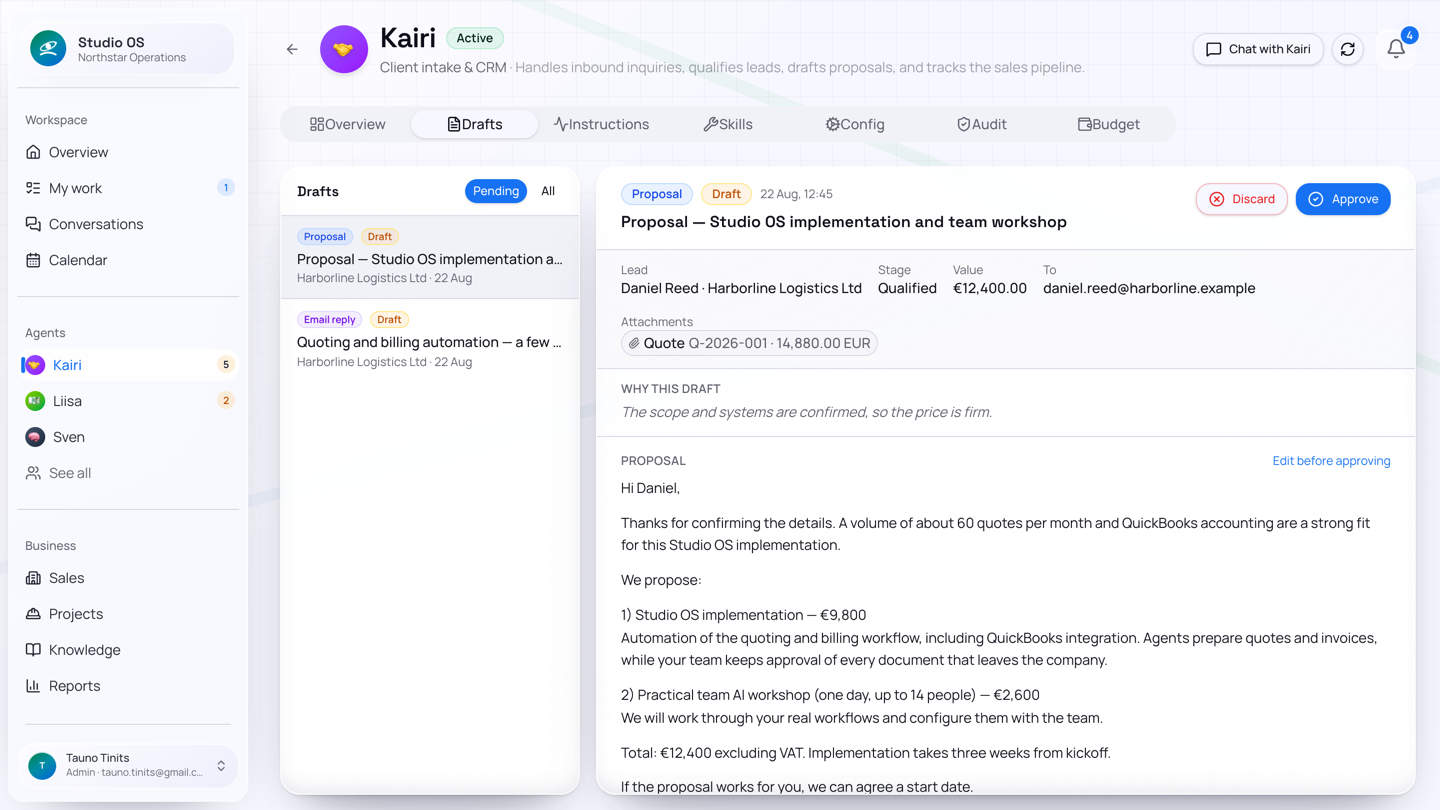
If the request is credible but incomplete, Kairi qualifies the deal and prepares a clarification email. The dashboard shows that a draft is waiting, and the full draft lives in Kairi's Drafts view.
You can edit, reject, or approve it. If auto-send approved drafts is enabled, approval sends it;
otherwise the approved draft waits for Send. A delivery failure does not erase your approval—the
draft records the error so it can be retried.
3. The proposal is prepared and sent
Sofia replies with team size, timing, and enough commercial detail. Kairi completes the earlier follow-up, updates the client state, and prepares either:
- a structured quote with line items and a PDF, when reliable prices are available; or
- a proposal draft without invented prices, when the commercial shape is known but pricing still needs human input.
The deal moves through Qualified and Proposal while the client record stays intact. You review and send the proposal from the draft workspace.
4. Acceptance becomes a real decision
Sofia replies to the already-sent proposal: “Approved—let's start next month.” Kairi does not mark the deal won by herself. She creates a medium-risk approval card containing the proposal reference and the customer's acceptance as evidence.
On Approvals, you confirm or reject the win. This is the commercial commitment boundary.
When you approve:
- the current open deal closes as Won and leaves the open pipeline board;
- a linked structured quote, if present, becomes accepted;
- one linked delivery project is created automatically;
- the accepted sales context is frozen into a project handoff brief and project document; and
- Madis receives the project with that brief.
Dragging a deal to the Won drop zone on the Sales board is the manual equivalent.
5. Sales history remains useful
The client page now shows:
- Marren and all its contacts;
- the won deal in deal history;
- the linked project;
- notes, email, documents, state, and activity associated with the relationship.
The next inquiry from Marren can open a new deal on the same client. Nothing needs to be duplicated or overwritten.
The state at each step
| Moment | Client | Deal | Waiting for you? | Main surface |
|---|---|---|---|---|
| First relevant email | Created | New/Qualified | Review clarification draft | Dashboard + Kairi Drafts |
| Enough detail to offer | Unchanged | Proposal | Review and send proposal | Kairi Drafts |
| Customer accepts sent proposal | Unchanged | Proposal | Confirm the win | Approvals |
| Win approved | Active relationship | Won | No | Sales history + new project |
Next: Running the project.