Running the project — how Madis delivers the Marren rollout
The Marren deal is won. Studio OS has created one linked client project, stored the accepted sales context as a frozen brief, and handed the work to Madis. The project starts Active; its plan can still contain a planning phase without pretending delivery has not started.
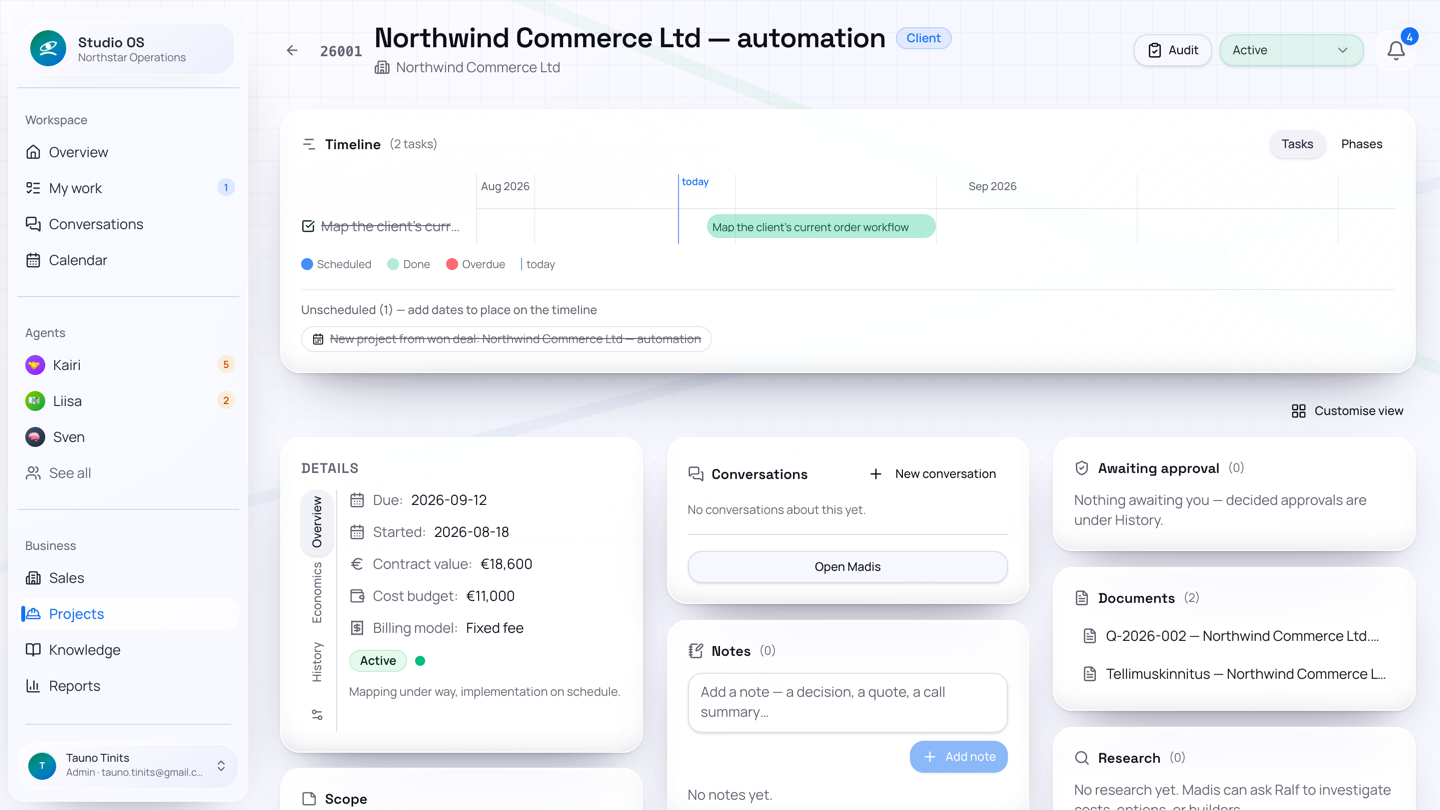
The project page is the delivery record
The project page brings together the facts Madis and the team need:
- status, health, type, client, address, dates, budget, and status note;
- the frozen sales-to-delivery brief;
- phases and tasks, including dates, labels, completion, and optional assignees;
- related email and documents;
- notes and activity; and
- a link to the more detailed audit view.
A won deal also creates project commercial documents on a best-effort basis. If the document or accounting integration is temporarily unavailable, the legitimate win and Madis handoff still survive.
1. Madis turns the brief into a plan
Madis reads the exact deal brief rather than reconstructing the sale from memory. For a rollout he might create phases and tasks for discovery, provisioning, integrations, configuration, pilot, training, go-live, and invoicing. He adds dates and assignees where the information is known and records missing facts instead of inventing them.
Project tasks can be created, edited, scheduled, reassigned, completed, and displayed on a Gantt view. A task assigned to a recognised teammate appears in their My work queue. They can report progress, a blocker or completion; Madis tracks the dependency and follows up. An external assignee without an account remains a named dependency.
2. Customer communication uses the shared outbox
Madis has the project context, so he prepares the project reply. The draft is stored in the shared message outbox and reviewed through Kairi's Drafts workspace. This gives sales and project email the same send history and Gmail delivery path.
The review rhythm is:
- read the subject, recipient, rationale, body, and attachments;
- edit if necessary;
- approve; and
- send, unless company settings send approved drafts automatically.
Incoming replies are filed against the matching client's live project when thread or classification evidence is strong enough. An informational project email can be filed without creating work; actionable mail wakes Madis.
3. Specialist work is delegated
Madis stays inside the delivery lane:
- research questions go to Ralf;
- finance and invoice requests go to Liisa;
- consequential file operations or business decisions become approvals; and
The handoff or proposed action carries the project context, so you can see why it exists without rebuilding the story yourself.
4. The status tells the truth
Projects can be Planning, Active, On hold, Done, or Cancelled. If Marren is late with access credentials, Madis can record the blocker and move the project to On hold. When the dependency is resolved, it returns to Active. Status, status note, tasks, and activity make the reason visible.
5. Delivery becomes finance
At a billable milestone, Madis requests an invoice from Liisa. Liisa prepares the invoice using the project and customer facts. Posting it to the connected accounting system is approval-gated; the official PDF and delivery draft follow the configured finance flow. Synchronisation later updates payment state and overdue visibility.
When the work is complete, the project moves to Done. Sven's next company-state and board view can then reflect the delivered project and finance state.
What you did was review external communication, confirm material decisions, and approve finance. What Studio OS kept moving was the brief, plan, tasks, routing, files, status, specialist requests, and audit trail.
Next: Operating Studio OS.